
Software de CRM para la fabricación en 2026.
Por qué un CRM genérico no funciona para los fabricantes y qué elegir en su lugar.

Christian Wettre
EVP, GM North America
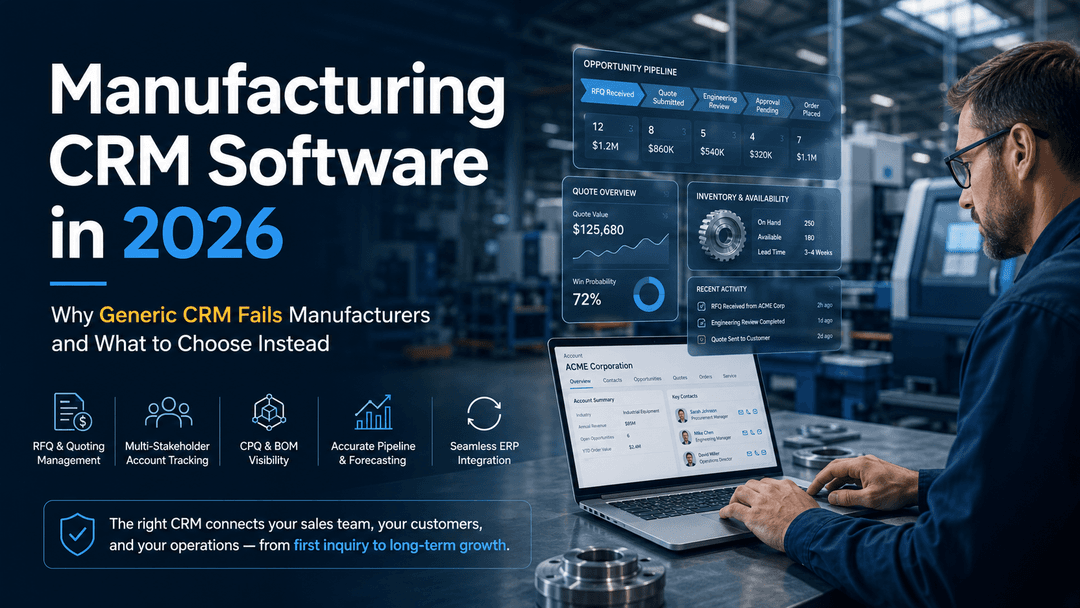
La mayoría de los fabricantes dejaron de preguntar hace años si necesitan un CRM. La pregunta en 2026 es si el CRM que tienen —o el que están evaluando— puede realmente manejar la forma en que funcionan las ventas de manufactura.
Eso es una pregunta completamente distinta. Y la mayoría de los artículos sobre el "mejor CRM" no se acercan a responderla.
Los consejos genéricos de CRM se basan en pipelines simples de ventas internas: registrar una llamada, mover un trato a la siguiente etapa, enviar un seguimiento. Las ventas de manufactura no funcionan así. Tus representantes gestionan ciclos largos con múltiples partes interesadas, navegan RFQs, coordinan con ingeniería para configuraciones personalizadas y tratan de cotizar con inventario en vivo y restricciones de producción. Un CRM que no puede soportar ese flujo no es una herramienta de productividad. Es una carga de informes.
El verdadero problema: 86% de los fabricantes ya utilizan CRM, pero la adopción por sí sola no genera resultados.
Cuando la plataforma no se ajusta al flujo de trabajo, los representantes lo abandonan por hojas de cálculo, la calidad de los datos se desploma y la confianza en las previsiones desaparece.
Esta guía es para equipos de compra - VP de Ventas, operaciones de ventas, CIO/IT y líderes de operaciones - que desean evaluar un CRM de manufactura de la manera correcta. Cubriremos lo que un CRM de manufactura realmente necesita hacer, dónde encajan y fallan las plataformas líderes, y cómo gestionar un proceso de selección que no termine en una implementación fallida.
Conclusiones clave:
- Los CRM genéricos se descomponen en los puntos exactos en los que las ventas de manufactura dependen más
- La integración con ERP suele ser el factor decisivo, no la amplitud de características
- La plataforma adecuada depende de la complejidad de tu flujo de cotización a pedido, la arquitectura de ERP y la estructura del equipo
- Un proceso estructurado de RFP es lo que separa una buena selección de un costoso error
¿Qué es realmente un CRM de manufactura?
Un CRM de manufactura no es una glorificada base de datos de contactos. Es el sistema orientado al cliente que gestiona todo, desde la primera consulta hasta la cotización, la transferencia del pedido y el servicio postventa, a lo largo de un ciclo de ventas que puede durar meses e involucrar ingeniería, adquisiciones y operaciones junto con ventas.
La distinción central: ERP es tu sistema de registro para pedidos, inventario, producción y finanzas. CRM es tu sistema de interacción para cuentas, oportunidades, cotizaciones y relaciones con clientes. Cuando los dos no se comunican, las ventas trabajan a ciegas y las operaciones se llevan sorpresas constantes.
Los flujos de trabajo que un CRM de manufactura necesita soportar se ven muy diferentes a los de un CRM SaaS o minorista:
- Gestión de RFQ y cotización - seguimiento de fuentes de solicitud, tiempos de respuesta, participación de ingeniería y tasas de éxito
- Gestión de cuentas con múltiples partes interesadas - gestionar contactos a través de compras, ingeniería, operaciones y niveles ejecutivos dentro de una misma cuenta
- CPQ y visibilidad de BOM - configurar productos con datos reales de lista de materiales, no con listas de precios estáticas
- Etapas de pipeline que reflejen la realidad de la manufactura - RFQ recibido, cotización enviada, revisión de ingeniería, aprobación pendiente, pedido realizado
- Acceso a datos de ERP en el flujo de ventas - inventario en vivo, plazos, precios y estado de pedido sin abandonar el CRM
ERP sigue siendo la fuente única de verdad mientras que el CRM gestiona los flujos de trabajo orientados al cliente. La integración entre ambos no es algo opcional. Es lo que determina si tu equipo de ventas confía en el sistema o lo evita. Hemos escrito sobre por qué los fabricantes rechazan un CRM que ignora ERP - y el patrón es consistente: sistemas desconectados cuestan a los fabricantes entre un 20-30% en ingresos perdidos solo por ineficiencias operativas.
Sin esa integración, obtienes dos sistemas que cuentan cada uno una historia parcial, y un equipo de ventas que llena ese vacío con hojas de cálculo.
Por qué los CRM genéricos fallan en entornos de manufactura
Aquí está el patrón que vemos repetidamente. Un fabricante elige un CRM popular basado en una demostración atractiva y una marca reconocible. La implementación inicia. Seis meses después, los representantes registran actividades pero no usan el flujo de cotización. Las previsiones son imprecisas. TI mantiene una integración frágil que se rompe cada vez que ERP se actualiza. La dirección pregunta por qué la adopción es baja. La respuesta suele ser la misma: la plataforma no fue creada para esto.
El patrón es consistente en entornos de manufactura: los CRM genéricos están optimizados para software simple y pipelines de ventas internas, y tratan a cada cliente como un lead nuevo. Ese modelo se desmorona en contextos industriales donde las cuentas tienen años de historial de pedidos, múltiples contactos de compra y relaciones complejas de reorden y servicio.
Dónde falla el CRM genérico
Los puntos de fallo son consistentes entre fabricantes:
- Gestión de cotización y RFQ: la mayoría de los CRMs genéricos carecen de un flujo de RFQ nativo. Los reps crean cotizaciones en hojas de cálculo o herramientas externas y pegan los resultados manualmente.
- Transferencias a ingeniería - no hay una forma estructurada de involucrar a ingeniería para configuraciones personalizadas o revisiones de especificaciones, por lo que se hacen por correo y se pierden.
- Precisión de las previsiones: sin datos de ERP, los valores de pipeline se basan en estimaciones del representante en lugar de señales reales de pedidos e inventario.
- Visibilidad posventa - una vez que se realiza un pedido, el CRM “se apaga”. Los problemas de servicio, reordenes y oportunidades de expansión de cuentas viven en ERP y correo electrónico, no en el CRM.
- Adopción - cuando el sistema no coincide con la forma en que los reps trabajan, dejan de usarlo. Investigaciones de la industria sitúan las tasas de fracaso de proyectos de CRM en torno al 70%, con un encaje deficiente como el motor principal.
El costo de un mal ajuste no es solo una licencia desperdiciada. Es menor calidad de datos, menor confianza en las previsiones y un equipo de ventas que ha aprendido a trabajar alrededor del sistema en lugar de con él. Eso es costoso de revertir.
La buena noticia: 94% de los fabricantes reportan mejoras en la productividad de ventas después de implementar un CRM bien ajustado. La frase operativa es "bien ajustado". La plataforma importa menos que el ajuste.
Qué buscar en un CRM de manufactura
Antes de abrir una sola demostración de proveedor, define lo que tu CRM necesita hacer. No en términos de características, sino en términos de flujos de trabajo. El marco de evaluación que funciona para los fabricantes es impulsado por casos de uso, no por hojas de especificaciones.
Estas son las capacidades que separan un CRM adaptado a manufactura de uno genérico:
- Soporte de flujo de trabajo de cotización a pedido - ¿Puede el CRM gestionar RFQs, aprobaciones de múltiples niveles y configuraciones de producto personalizadas? ¿Soporta CPQ de forma nativa o se integra limpiamente con una capa CPQ?
- Profundidad de la integración con ERP - ¿La integración es en tiempo real o por lotes? ¿Puede el equipo de ventas ver inventario en vivo, precios, plazos y estado de pedido dentro del CRM? ¿Quién es el dueño de la integración cuando ERP se actualiza?
- Gestión de cuentas con múltiples partes interesadas - ¿Puede el sistema rastrear relaciones a través de compras, ingeniería, operaciones y contactos ejecutivos dentro de una jerarquía de cuentas?
- Etapas de pipeline específicas para manufactura - ¿Puede configurar etapas que reflejen su movimiento real de ventas, RFQ, cotización, revisión de ingeniería, aprobación, pedido, en lugar de forzar su proceso en un embudo genérico?
- Pronósticos ligados a datos reales - ¿El pronóstico extrae señales de pedido de ERP y de la capacidad de producción, o se basa únicamente en estimaciones introducidas por el representante?
- Base instalada y visibilidad de servicio - ¿Puede el CRM rastrear lo que cada cuenta ha comprado, cuándo vence el servicio y qué oportunidades de reorden o expansión existen?
- Encaje de adopción - ¿La experiencia móvil, los tableros y los flujos de trabajo diarios están diseñados para los representantes de ventas de campo, y no solo para equipos de ventas internos de oficina? El acceso móvil al CRM por sí solo puede aumentar la productividad hasta en un 50%.
La pregunta para hacer en cada demostración: "Muéstrame cómo un representante maneja una RFQ desde su recepción hasta la presentación de la cotización y la revisión de ingeniería." Si el proveedor tropieza, esa es tu respuesta.
El CRM correcto no es aquel con más funciones. Es aquel en el que tus representantes pueden completar su flujo de trabajo diario real sin abandonar el sistema, y donde TI puede mantener la integración con ERP sin que se convierta en un trabajo a tiempo completo.
Recomendaciones de CRM para la manufactura en 2026
No existe un único CRM de manufactura que sea el mejor. Pero sí hay escenarios claros de mejor ajuste. Así es como las plataformas líderes se comparan a través del lente de la complejidad del flujo de trabajo de manufactura, la integración con ERP y la realidad de la implementación.
| Platform | Best Fit | Strengths | Watch-Outs |
|---|---|---|---|
| Salesforce Manufacturing Cloud | Large, process-mature manufacturers with dedicated IT resources | Deep ecosystem, strong configurability, AI features, partner network | High total cost of ownership, implementation complexity, and requires significant configuration to fit manufacturing workflows |
| Microsoft Dynamics 365 | Manufacturers already invested in the Microsoft stack (Azure, Teams, Power BI) | Broad integration across sales, service, and operations; familiar UX for Microsoft shops | Licensing complexity, module sprawl, and integration depth vary by ERP |
| SugarAI | Mid-market manufacturers that need strong relationship visibility, workflow flexibility, and clean ERP integration without enterprise-suite overhead | Highly configurable, strong account and contact management, AI-powered forecasting and relationship insights, lower TCO than enterprise alternatives | Requires an experienced implementation partner to configure for manufacturing workflows |
| HubSpot | Smaller manufacturers with simpler sales cycles and limited ERP dependency | Fast to deploy, strong marketing-to-sales handoff, good UX | Limited manufacturing-specific workflow depth, quoting, and CPQ require third-party add-ons, and ERP integration is not native |
| Odoo / Zoho | Budget-conscious manufacturers or those evaluating CRM as part of a broader platform consolidation | Low cost, broad feature sets, and built-in ERP module3 in Odoo | Workflow depth and data governance need careful evaluation; implementation quality varies widely by partner |
A Note sobre las opciones de CRM nativo de ERP
Si tu organización utiliza Epicor Kinetic, vale la pena evaluar cuánta de tus necesidades de CRM pueden cubrirse mediante las capacidades nativas de gestión de clientes de Epicor antes de añadir una capa de CRM separada. Para muchos fabricantes, la respuesta es que todavía es necesario un CRM dedicado, especialmente para la gestión del pipeline de ventas, la planificación de cuentas y los flujos de trabajo orientados al cliente que quedan fuera del ERP. Pero la arquitectura de integración se ve muy diferente dependiendo de si conectas SugarCRM a Epicor frente a conectar Salesforce a un ERP no-Epicor.
Las plataformas que consistentemente rinden bien en entornos de manufactura comparten una característica: o fueron construidas para flujos de trabajo de manufactura o han sido configuradas a fondo por un socio de implementación que las comprende. Como muestran de forma constante los análisis de tendencias de CRM para 2026, la ventaja competitiva proviene de cómo las empresas configuran datos, IA y flujos de trabajo, y no simplemente de tener un CRM en marcha.
El socio de implementación importa tanto como la plataforma. Un ejemplo bien configurado de SugarCRM superará a una implementación de Salesforce mal realizada cada vez. Evalúa la profundidad de manufactura de tu socio junto con el software.
Cómo ejecutar un proceso de selección de CRM que no termine en un despliegue fallido
La mayoría de los procesos de selección de CRM fallan antes de la primera demostración. Comienzan con una lista de características, no con un mapa de flujos de trabajo. Involucran a TI y compras, pero no a los representantes de ventas que vivirán en el sistema. Y evalúan el software sin evaluar al socio de implementación que lo configurará.
Aquí está el proceso que realmente funciona para los fabricantes:
Paso 1: Define tus casos de uso primero
Comienza con los flujos de trabajo que más importan: la rapidez de la respuesta de cotización, la respuesta a RFQ, la visibilidad de pronósticos, la transferencia a ingeniería, la planificación de cuentas y la coordinación de servicios. Documenta lo que "bueno" significa para cada uno. Estos se convierten en tus criterios de evaluación, no la lista de características de un proveedor.
Paso 2: Reúne a las personas adecuadas en la sala temprano
Ventas, operaciones y TI deben estar alineados antes de que comiencen las demostraciones. TI define los requisitos de integración y la propiedad de los datos. Operaciones define lo que necesitan de la transferencia de ventas. Ventas define qué se adoptará y qué no. Si esas conversaciones ocurren después de que hayas elegido un proveedor, ya estás en problemas.
Paso 3: Evalúa a los socios de implementación tan cuidadosamente como al software
Pregunta a cada proveedor: ¿quién implementará esto y qué despliegues de manufactura han completado? Solicita referencias de fabricantes con entornos ERP similares y complejidad de ventas. Un socio con experiencia profunda en manufactura configurará el sistema para que se ajuste a tus flujos de trabajo. Un generalista lo configurará para ajustarse a la demostración. Para una mirada más profunda sobre lo que separa a los dos, lee CRM para fabricantes: Deja de comprar software, empieza a comprar experiencia.
Paso 4: Usa un RFP estructurado para obtener respuestas reales
Las demostraciones genéricas muestran lo que el software puede hacer en condiciones ideales. Un RFP bien estructurado obliga a los proveedores y a los socios a responder preguntas específicas de flujo de trabajo, como: ¿Cómo maneja su plataforma la gestión de RFQ? ¿Qué aspecto tiene la arquitectura de integración con ERP? ¿Quién posee la integración cuando el ERP se actualiza?
"Los fabricantes generalmente necesitan una configuración o plataforma CRM específica para manufactura, no solo un producto CRM genérico."
Esa distinción — configuración frente al producto — es lo que separa un CRM que se adopta de uno que se abandona.
Elige por el encaje de flujo de trabajo. Usa el RFP para Validarlo.
El caso de ROI para un CRM de manufactura es sólido. Los fabricantes que usan CRM reportan un aumento del 21-30% en ventas, una mejora del 42% en la precisión de pronósticos, y retornos que oscilan entre $3.10 y $8.71 por cada dólar invertido cuando la implementación se realiza correctamente. Pero esos números pertenecen a organizaciones que eligieron una plataforma que se ajusta a su flujo de trabajo y la implementaron con un socio que entendía la manufactura.
Los fabricantes que no ven esos resultados cometieron uno de dos errores: eligieron una plataforma basada en el reconocimiento de marca en lugar del ajuste al flujo de trabajo, o subestimaron la complejidad de la implementación y se la confiaron a un generalista.
La versión corta:
- No existe un CRM de manufactura universalmente el mejor, solo el mejor ajuste para tu movimiento de ventas, arquitectura de ERP y complejidad operativa
- La integración con ERP es el factor decisivo, no la amplitud de características
- El socio de implementación es tan importante como la plataforma
- Un proceso estructurado de RFP es la forma de obtener respuestas reales antes de firmar nada
Si estás en una evaluación activa, la forma más rápida de afinar tus requisitos es empezar con las preguntas adecuadas.
Descarga nuestra plantilla de RFP de CRM gratuita - 93 preguntas imprescindibles que cubren la adecuación del flujo de trabajo, la integración con ERP, el enfoque de implementación y la calificación de socios. Está diseñada específicamente para equipos de compra de manufactura que quieren evitar errores costosos.
Y si tu equipo ya está inmerso en conversaciones con proveedores y quiere una segunda opinión sobre el ajuste de la plataforma o la arquitectura de integración, estaremos encantados de conversar. Hemos pasado 25 años implementando CRM y ERP para fabricantes en las Américas. Sabemos qué funciona y qué no.


