
Improve Efficiency Through AI Order Entry Automation in Epicor ERP.
A Prioritization Guide for High-ROI AI Use Cases.

Gonzalo Nuñez
Chief Technology Officer
For manufacturers running Epicor Kinetic, the pressure to automate is real - and so is the confusion about where to start. Purchase orders arrive as PDFs, emails, and spreadsheets from dozens of customers every day. Each one requires someone to open it, read it, match the customer and part numbers, check the ship-to address, verify payment terms, and key it into Epicor manually. Multiply that by hundreds of orders a week, and you have a process that is expensive, error-prone, and completely unscalable.
The question most Epicor manufacturer users ask us is not "should we automate order processing?" They already know the answer. The question is: which use cases should we automate first, and what do we need to do before we start?
This guide answers both. It covers how to prepare your Epicor data for AI automation, how to prioritize the use cases that deliver the fastest ROI, and how to understand where Epicor's native capabilities end and where a purpose-built automation layer like Fluent begins.
What Is AI Order Entry Automation, and How Is It Different?
Traditional order entry programs in an Epicor environment look like this: a customer emails a PDF purchase order, someone on your team opens it, manually reads the line items, looks up the matching Epicor part numbers and customer cross-references, and keys the sales order by hand. Even with experienced staff, this process takes 5 to 20 minutes per order and carries a meaningful error rate.
AI order entry fundamentally changes the workflow. Instead of a person reading and keying, an AI agent reads the incoming document - whether it is a PDF, image, Excel file, XML, or EDI transmission - extracts the order data, matches the customer record and SKUs against your Epicor master data, determines the correct ship-to address and payment terms, and creates the sales order automatically. The result is zero-touch processing from customer email to Epicor sales order creation.
Generative AI order processing software goes further than legacy OCR or rule-based tools. Where older systems required rigid templates and broke on any formatting variation, generative AI reads unstructured documents the way a human would - understanding context, handling variations in how customers describe part numbers, and flagging exceptions for human review rather than failing silently.
This is the foundation of Fluent, TCP Americas' AI automation platform built specifically for Epicor Kinetic and SugarCRM environments. Fluent agents process documents from a dedicated inbox, match against your existing Epicor data structures, and post directly to your ERP - without replacing or working around the system you already rely on.
Why Epicor Users Face Unique Automation Challenges.
Not all ERP automation challenges are equal. Epicor Kinetic has a specific data model that generic automation vendors do not deeply understand - and that gap is exactly where automation projects fail.
Here is what matters in Epicor's data structure for automated sales order entry:
Customer master accuracy. Epicor stores customer records, including ship-to addresses, payment terms, price list assignments, and tax settings, at the customer and ship-to levels. If a customer has three ship-to locations but only one is set up correctly in Epicor, an AI agent matching against that record will either post to the wrong address or flag every order from that customer as an exception.
Part and item master completeness. Epicor uses part cross-reference tables to map a customer's part number (what they call it on their PO) to your internal Epicor part number (what you call it in your system). If those cross-references are missing or outdated, the AI agent cannot complete the match and the order requires manual intervention - defeating the purpose of automation.
BAQ configurations and custom fields. Many Epicor implementations include custom Business Activity Queries and fields that capture business-specific data. Automation that does not understand your specific Epicor configuration will miss these fields or populate them incorrectly.
Historical order data. AI matching logic improves with exposure to real order history. A manufacturer with six or more months of clean, consistent order data in Epicor will see significantly better matching accuracy from day one than one whose historical data is fragmented or inconsistently entered.
After 25 years of implementing Epicor Kinetic for manufacturers across the United States, TCP Americas built Fluent's matching logic around these exact data structures. Fluent understands Epicor natively - not as a generic integration, but as a system our team has configured, customized, and optimized hundreds of times.
Data Quality Comes First: The Epicor Readiness Checklist.
This is the step that most data entry automation solutions for sales order entry skip entirely - and it is the single most common reason automation pilots underperform.
Before you automate order entry in Epicor, run through these three readiness checks:
1. Customer master accuracy
- Are all active customers consistently entered in Epicor, with no duplicates?
- Do ship-to addresses match the addresses your customers actually use on their POs?
- Are payment terms and price list assignments current and correct?
- Are customer cross-reference records populated for your top 20 to 30 customers by order volume?
2. Item and part master completeness
- Are part cross-references set up for the part numbers your highest-volume customers use on their purchase orders?
- Are part descriptions standardized, or do similar parts have inconsistent naming conventions?
- Are unit-of-measure conversions configured for customers who order in units different from the ones you stock?
3. Historical order data quality
- Do you have at least six months of sales order history in Epicor entered consistently?
- Are there patterns of manual corrections or overrides that signal recurring data mismatches?
- Have you audited for orders posted to incorrect customers, parts, or ship-to addresses?
Skipping this step not only reduces automation accuracy but also multiplies exceptions. An AI agent working against dirty Epicor data will flag a high percentage of orders for manual review, which means your team is doing the same work they did before, just with an extra tool in the way.
At TCP Americas, every Fluent deployment begins with a data readiness assessment. We review your Epicor customer master, item master, and order history before configuring a single agent. This is not overhead - it is what separates a successful automation rollout from a failed pilot.
Prioritizing High-ROI Use Cases in Epicor: Where to Start.
Once your Epicor data is ready, the next question is sequencing. Not all automation use cases deliver equal ROI, and not all are equally ready to deploy. Here is a practical scoring framework based on what we see across Epicor manufacturers:
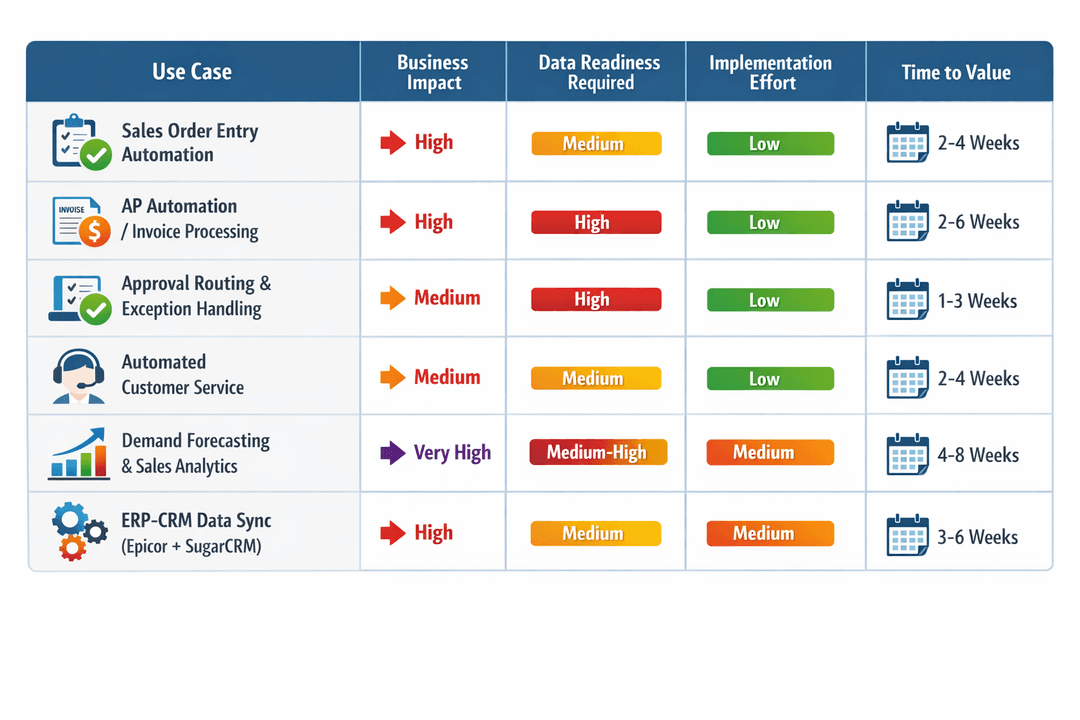
Start with order entry and AP automation. These two use cases share the same underlying logic - document ingestion, data extraction, ERP matching, and posting - and they deliver measurable ROI within weeks, not months. Order entry directly reduces labor costs and cycle time. AP automation eliminates manual invoice keying, reduces duplicate payments, and enables two-way and three-way matching, which most Epicor teams currently handle manually.
Add customer service automation next. Once your order data is flowing cleanly through Fluent, you can deploy an AI agent that answers customer questions about order status, tracking, and delivery - drawing directly from your live Epicor data. This reduces inbound calls and emails to your customer service team without requiring any new data infrastructure.
Move to demand forecasting and analytics after you have clean data flowing. Fluent's Data Analytics module lets your team query Epicor data in plain English - no SQL required - and generates AI-powered predictions for sales, inventory, and cash flow. This use case has the highest long-term value, but it requires the clean, consistent data history that the earlier use cases help you build.
Layer in ERP-CRM sync when both systems are active. For manufacturers using both Epicor Kinetic and SugarCRM, Fluent's Data Syncing capability keeps customer records, order history, and opportunity data consistent across both platforms. This eliminates duplicate entries and data drift, which erode CRM adoption in most manufacturing organizations.
Here is how each use case maps to a specific Fluent product:
- Automating order entry: Fluent Order Entry Automation (automated PO extraction, customer and SKU matching, zero-touch sales order creation in Epicor)
- Sales order automation software for AP: Fluent AP Automation (invoice extraction, two-way and three-way matching, zero-touch posting from vendor email to Epicor)
- Automated customer service: Fluent Automated Customer Service (AI agents trained on your Epicor data, embedded on your website or app)
- Demand forecasting and analytics: Fluent Data Analytics (natural language querying, automated dashboards, AI-powered sales and inventory predictions)
- ERP-CRM data sync: Fluent Data Syncing (Epicor Kinetic and SugarCRM, with custom integration available for other systems)
Epicor Native AI vs. Fluent: When to Use What.
This is the question we hear most often from Epicor users evaluating order process automation options, and it deserves a direct answer.
What Epicor Kinetic's native AI handles well:
Epicor has made meaningful investments in embedded analytics and AI capabilities within Kinetic. Kinetic Intelligence dashboards provide real-time operational visibility. Built-in Business Activity Queries (BAQs) enable custom reporting without external tools. Standard workflows for approvals, alerts, and notifications work reliably within the Epicor data model.
If your automation needs are primarily about reporting, standard workflow triggers, and visibility into data that already lives in Epicor, the native tools are often sufficient and should be your starting point.
Where native Epicor AI falls short:
Epicor's native capabilities are designed for structured, internal data. They do not process unstructured external documents, such as customer POs or vendor invoices, that arrive by email. They do not handle cross-system workflows between Epicor and SugarCRM. They do not support natural language querying for non-technical users. And they do not scale to handle high-volume document processing without significant custom development.
This is where sales order process automation with Fluent adds value - not by replacing Epicor, but by extending it.
The right framing: Fluent is not a competing system. It is an automation layer that sits on top of Epicor, reads from and writes to Epicor's data model directly, and handles the unstructured, high-volume, cross-system work that Epicor was not designed to do natively. TCP Americas builds every Fluent integration against each customer’s specific Epicor configuration, which means the automation respects your custom fields, BAQ configurations, and business rules rather than working around them.
Implementation Roadmap: How TCP Americas Deploys Fluent for Epicor.
Here is the typical deployment sequence for an Epicor manufacturer implementing Fluent for the first time:
Week 1 - Data readiness assessment
TCP Americas reviews your Epicor customer master, item master, part cross-references, and order history. We identify gaps, recommend cleanup priorities, and confirm which use cases are ready to deploy immediately versus which need data preparation first.
Week 1-2 - Use case selection and KPI definition
Based on the assessment, we select one or two pilot use cases - typically order entry automation or AP automation, depending on which has the higher volume and cleaner data. We define KPIs before go-live: order cycle time, exception rate, hours saved per week, and error rate.
Week 2-3 - Fluent agent configuration
We configure Fluent's agent inboxes, set up the Epicor integration for your specific instance, build the customer- and SKU-matching logic using your actual cross-reference data, and run test batches against historical orders to validate accuracy before going live.
Week 3-4 - Controlled pilot
We run one customer segment or document type through Fluent in parallel with your existing process. This validates accuracy in a real environment without risk to your live order flow.
Day 30-60 - Measure and scale
We review KPIs against baseline, identify any exception patterns that need matching logic refinement, and expand to additional use cases - AP automation, customer service, analytics, or SugarCRM sync - based on results and priority.
This is a materially different approach than a generic "under a month" promise from a vendor who has never worked inside your Epicor configuration. TCP Americas brings 25 years of Epicor implementation experience to every Fluent deployment, which means we understand your data model, custom fields, and business rules before we write a single line of automation logic.
Ready to Automate Order Entry in Your Epicor Environment?
Technology Coast Partners has implemented Epicor Kinetic for manufacturers across the United States for 25 years. Fluent is the AI automation platform we built specifically for Epicor and SugarCRM environments - not a generic tool retrofitted to work with your ERP, but a system designed from the ground up around Epicor's data model and the real operational workflows of manufacturers.
If you are ready to move from manual order entry to automated sales order processing, or if you want to understand which use cases make sense for your specific Epicor configuration, book a Fluent demo with our team.
Frequently Asked Questions
Yes. Fluent supports both Epicor Kinetic and SugarCRM integrations natively. This includes data syncing between the two systems, automated customer service drawing from both ERP and CRM data, and order and customer record consistency across both platforms. TCP Americas is one of the few implementation partners with deep expertise in both systems.
Order entry automation refers to the process of automatically extracting data from incoming purchase orders and creating sales orders in your ERP without manual keying. Sales order automation software is the platform that enables this - including document processing, customer and SKU matching, ERP integration, and exception handling. Fluent is sales order automation software purpose-built for Epicor Kinetic.
The three critical areas are customer master accuracy (normalized records, complete ship-to addresses, current cross-references), item and part master completeness (customer part cross-references for your top customers, standardized descriptions), and historical order data quality (at least six months of consistently entered order history). TCP Americas conducts a data readiness assessment at the start of every Fluent deployment.
Fluent integrates directly with Epicor Kinetic's data model, reading from and writing to your customer master, item master, ship-to records, and sales order tables. It uses your existing Epicor cross-reference data to match customer part numbers to internal part numbers, and posts completed sales orders directly to Epicor - no manual intervention required for clean matches.
For manufacturers with reasonably clean Epicor data, the typical timeline from kickoff to live production is three to four weeks for order entry automation or AP automation. More complex deployments involving custom Epicor configurations, data cleanup, or multiple use cases typically run six to eight weeks.


