
Choosing a CRM for Sage Intacct: Three Ways to Connect Sales and Finance
Three integration routes, what each one syncs, and how to pick the right one.

Christian Wettre
EVP, GM North America
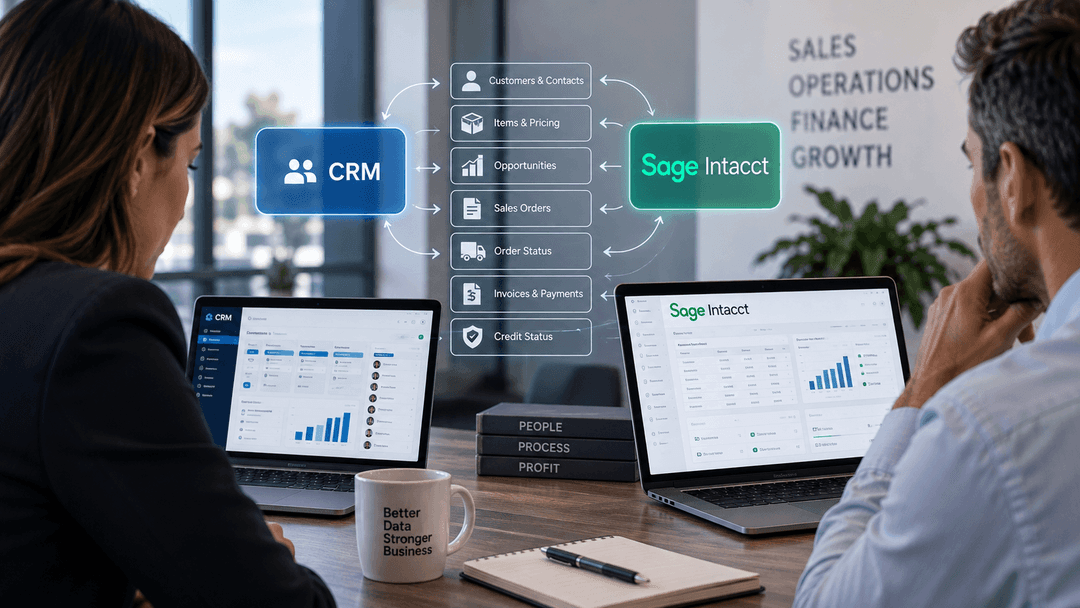
Finance runs on Sage Intacct. Sales runs somewhere else. And between those two systems sits a gap that costs both teams time every day.
Your reps quote accounts without seeing open invoices or current credit status. Finance re-keys closed deals into Sage Intacct because the CRM and Sage Intacct never spoke. An order gets entered twice. A rep calls an account that is on hold. A quote goes out with a price that changed last quarter.
None of these are technology failures. They are the predictable result of running sales and finance on disconnected systems.
This article covers three things. First, which records should move between a CRM and Sage Intacct, and who owns each one. Second, the three ways to connect a CRM to Sage Intacct, with what each route is good for and what to check before you commit. Third, how to choose the right route for your business and the five questions to settle before you start.
Why Sales and Finance Need the Same Customer Record
When sales and finance maintain separate versions of the same customer, both teams operate on assumptions. Sales assumes the account is in good standing. Finance assumes the rep knows about the outstanding balance. Neither assumption gets checked until something goes wrong.
The problems that surface are rarely dramatic. They are slow and expensive. A rep invests time in an account that finance has flagged for review. A quote goes out based on pricing that Sage Intacct no longer reflects. A deal closes and someone on the finance team re-enters it as a sales order. Multiply that across a sales team and a full quarter, and the cost is real, even if it never shows up as a line item.
The deeper issue is that two systems create two versions of the truth. The CRM holds relationship history, pipeline activity, and sales context. Sage Intacct holds invoices, payments, order history, and credit standing. Neither system is wrong. They are just incomplete without the other.
Connecting a CRM to Sage Intacct does not replace either system. It gives each team the context the other already has. Sales sees what finance knows. Finance sees what sales is working on. The customer record becomes one record, not two.
If you are weighing whether to keep everything in a single system or connect two specialized ones, the case for a dedicated CRM alongside your ERP is worth reading before you decide on a route. See why manufacturers use a dedicated CRM alongside their ERP.
What a CRM and Sage Intacct Integration Should Sync
Before you choose how to connect a CRM to Sage Intacct, you need to know what should move between the two systems and who owns each record. Ownership is the foundation. Every field that syncs needs a system of record, the one place where that data is created, updated, and authoritative. The other system reads it.
Each record is owned by one system, and the other system reads it. That rule applies to every row in the table below.
| Record | System of record | Sync direction |
|---|---|---|
| Customers and contacts | One system, decided before go-live | From the owning system to the other |
| Items and pricing | Sage Intacct | From Sage Intacct to CRM |
| Opportunities to sales orders | CRM for the opportunity; Sage Intacct for the sales order | Opportunity advances from CRM into Sage Intacct when the deal closes |
| Order status | Sage Intacct | From Sage Intacct to CRM |
| Invoices and payments | Sage Intacct | From Sage Intacct to CRM |
| Credit status | Sage Intacct | From Sage Intacct to CRM |
Deciding which system owns the customer record is the first design decision, and question 1 in the next section is where to settle it.
Most integration problems start with field mapping before ownership is resolved. Two teams each update the same customer record, the systems sync, and one update overwrites the other. The result is data that neither team trusts.
Establishing ownership first means the integration has a clear authority for every record type. Sage Intacct owns the financial records: items, pricing, invoices, payments, order status, and credit standing. Those flow to the CRM so sales has current context. The CRM owns the sales process: pipeline stages, activities, and opportunities. When a deal closes, the opportunity becomes a sales order in Sage Intacct.
Not every record needs to sync at the same frequency. Credit status and order status are time-sensitive, while items and pricing can often run on a schedule without creating problems for sales.
Three Ways to Connect a CRM to Sage Intacct
There is no single right way to connect a CRM to Sage Intacct. All three routes described below can work, and each one is a sound choice for a specific situation. The decision comes down to how standard your process is and how much flexibility you need.
Packaged Connector
A packaged connector is a prebuilt integration that links the CRM and Sage Intacct out of the box. It covers a defined set of records and syncs them on a schedule or closer to real time, depending on the product.
What it is good for: Businesses that want to get the integration running quickly and whose sales and finance processes fit the standard record set the connector supports. If your quoting, order, and invoicing workflows are straightforward and close to out-of-the-box behavior in both systems, a packaged connector can deliver a working integration without significant configuration work.
What to check: Which records sync, in which direction, and how often. Confirm that the records your sales team needs, such as credit status, invoice history, and order status, are included in the standard sync. Understand what happens when a record type or a field your business uses falls outside the connector's standard scope.
Integration Platform
An integration platform is a configurable layer that connects the CRM and Sage Intacct through flows you define. The platform provides the infrastructure and the connections to both systems. Your team, or a partner, configures the logic.
What it is good for: Businesses that need more than a standard record set, or that need to coordinate Sage Intacct with several systems at once. If you have custom fields, approval steps, or data that needs to move through more than two systems, an integration platform gives you the flexibility to map those requirements without writing custom code from scratch.
What to check: Who configures the flows, and who maintains them after go-live. Integration platforms require ongoing attention when either system is updated or when business processes change. Make sure there is a clear owner for that work before you commit to the route.
Custom System Integration
A custom system integration is designed specifically around your workflows, your data model, and your operating requirements. It is built and deployed by an integration partner who understands both the CRM and Sage Intacct.
What it is good for: Businesses with quoting, pricing, multi-entity, or approval workflows that are specific to how they operate. If your process does not fit a standard connector and the configuration options of an integration platform are not enough, a custom integration gives you an architecture built for your business rather than adapted from a generic template.
What to check: Documentation, ownership, and support. A custom integration is an asset. You should know how it is documented, who owns it, and how it is maintained when either system is upgraded or when your business requirements change.
All three routes connect SugarAI to Sage Intacct. The right one depends on how standard your process is.
How to Choose the Right Route
The right integration route is the one that fits your process, not the one that sounds most sophisticated. Use the table below as a starting point.
| Your situation | Route to consider |
|---|---|
| Standard process, want to move quickly | Packaged connector |
| Several systems to coordinate, or moderate custom field mapping needed | Integration platform |
| Unique quoting, pricing, multi-entity structure, or approval workflows | Custom system integration |
No route in this table is a shortcut and no route is a compromise. Each one is appropriate for a different operating context. A business with straightforward order and invoicing workflows has no reason to build a custom integration. A business with complex approval hierarchies across multiple entities has no reason to expect a packaged connector to handle them.
It is also worth noting that the route you start with does not have to be the route you keep. Many businesses begin with a packaged connector or an integration platform and move to a custom integration as their operations grow or as their process becomes more specific. The integration should serve the business you have, and it can evolve as that business changes.
Talk to TCP about connecting SugarAI and Sage Intacct
Five Questions to Ask Before You Start
The integration route matters less than the decisions you make before you build it. These five questions surface the requirements that will shape your design.
1. Which system owns the customer record, and which one reads it? A good answer names one system as the owner and explains what triggers a record to be created there. If both teams say "we own the customer," that is the first problem to resolve before any integration work begins.
2. Which records must reach sales, and how fresh do they need to be? A good answer lists specific record types, such as credit status, open invoices, and order history, and describes how current they need to be. "Sales needs to know before they call" is a freshness requirement. "End of day is fine for pricing" is a different one.
3. When a deal closes, what should happen in Sage Intacct, and who approves it? A good answer describes the exact step: does a closed opportunity become a draft sales order, a confirmed order, or something that waits for finance to review? Knowing the approval chain before go-live prevents the integration from creating records that then sit unprocessed.
4. Who maintains the integration after go-live? A good answer names a person or a team, not just a role. Integrations require attention when either system is updated, when fields change, or when business processes shift. An integration without a named owner tends to break quietly.
5. What happens to the integration when either system is upgraded? A good answer describes a process, not just a hope. Upgrades to Sage Intacct or to the CRM can change APIs, field names, or data structures. Understanding how your integration handles that before you build it is part of choosing the right route and the right partner.
Where to Start
Start with a list, not a vendor conversation. Write down every record that sales and finance share. Mark which system owns each one. Note how fresh each record needs to be in the reading system.
That list is your integration requirement. Once you have it, the route becomes clearer. A standard record set with no unusual ownership rules points toward a packaged connector. Custom field mapping or multiple connected systems points toward an integration platform. A process that does not fit either of those points toward a custom system integration.
If your process needs a custom integration, TCP designs and deploys SugarAI integrations with Sage Intacct.


