
Should You Use the CRM That Came With Your ERP?
A practical decision guide for manufacturers who already have customer data in their ERP.

Christian Wettre
EVP, GM North America
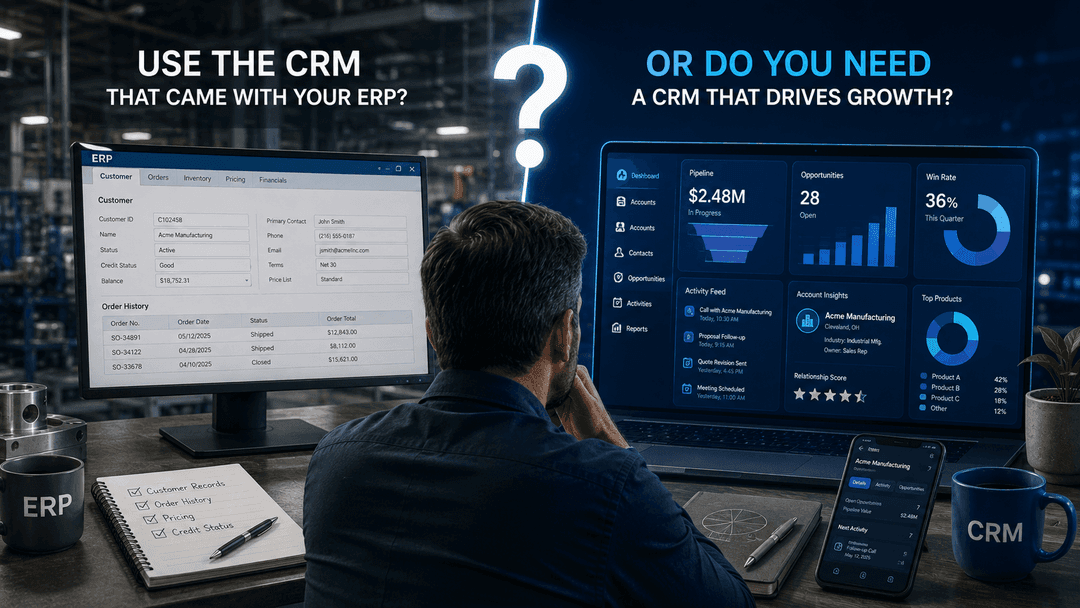
Your ERP already holds your customer records, your order history, and your pricing. So the question is fair: why would you add a second system to manage customer relationships when the first one already knows who your customers are?
The honest answer is that it depends on how your sales team works. For some manufacturers, the CRM bundled with the ERP handles everything the commercial team needs. For others, the workflows that drive pipeline, territory coverage, and repeat business are happening outside the system entirely - in inboxes, notebooks, and spreadsheets that no one can report on. The difference between those two situations is not a matter of company size or industry segment. It is a matter of how pre-order relationship work actually gets done.
This article separates the conditions where your ERP's CRM is genuinely sufficient from the operational symptoms that justify a dedicated CRM. It closes with a six-question test you can apply to your own operation this week.
What the CRM in Your ERP Actually Does Well
The CRM module in your ERP is not a consolation prize. For a meaningful share of manufacturers, it is the right tool for the work.
When your ERP includes a customer record with contact details, order history, credit status, and pricing, your sales team has access to the most operationally relevant information about that account without logging into a second system. That is a genuine advantage. Synchronization errors, duplicate records, and questions about which system holds the authoritative version of a customer's data are problems that arise when two systems share responsibility for the same record. Staying in one system eliminates that class of problem entirely.
The ERP's CRM tends to be sufficient when four conditions are true:
- Your sales team is small, and sales activity can be tracked informally without structured pipeline management.
- Your catalog is stable, and quoting is straightforward enough that reps do not need to manage multiple revisions across multiple accounts simultaneously.
- Your customer base is largely repeat business, where the relationship is maintained through delivery performance and account management rather than active prospecting.
- Your sales cycle is short, and the commercial work between first contact and purchase order does not require documented multi-step orchestration.
When those conditions hold, the bundled CRM is doing its job. Adequate does not mean inferior. It means the system fits the work.
If you recognize your operation in that description, the rest of this article will help you confirm that conclusion. If you are not sure, the six-question test in Section 4 will tell you.
Where the ERP's CRM Usually Stops
When the conditions above do not hold, the ERP's CRM tends to stop at the boundary of the transaction. It records what was ordered. It does not manage the work that happens before the order exists.
The symptoms below are operational, not theoretical. Each one describes a workflow that a dedicated CRM is built to support and that most ERP-native customer modules are not.
- Pipeline and forecasting. Your ERP records orders that have been placed. It does not track opportunities in progress, probability of close, or expected revenue from accounts that have not yet committed. Without that visibility, sales forecasts are built from memory or spreadsheets, and leadership cannot distinguish a slow quarter from a lost pipeline.
- Activity and relationship history. Calls, follow-up emails, meeting notes, and approval conversations exist in personal inboxes and notebooks rather than on the account record. When a rep leaves or a territory changes hands, that history leaves with them.
- Territory and account planning. Assigning accounts to reps, identifying white-space within existing customers, and planning coverage across a region require structured account hierarchies and assignment rules that most ERP CRM modules do not provide.
- Quoting workflow. Complex quotes go through multiple revisions, involve internal approvals, and require version tracking. When that process happens outside the system, there is no audit trail and no way to understand why deals stall or margin erodes.
- Distributor and channel relationships. Managing relationships with distributors, rep agencies, or channel partners requires a layer of account structure and activity tracking that sits above the transactional record. ERP systems model what distributors ordered, not how the relationship is being developed.
- Marketing and nurture. Segmenting accounts for outreach, tracking campaign responses, and managing re-engagement sequences require contact-level data and workflow automation that fall outside the scope of an ERP customer record.
- Mobile and field use. Sales reps working on-site at customer facilities need to log activity, access account history, and update opportunity status from a phone or tablet. Most ERP interfaces are not designed for that use case, which means field activity goes unrecorded.
Customer part-number to internal-SKU mapping is a related but distinct workflow. For context on where that responsibility sits when a CRM and ERP operate together, see our article on AI workflow automation and ERP.
The Test: Six Questions That Settle It
Before evaluating any software, answer these six questions about your current operation. They are capability questions. A yes means the capability already exists in your ERP. A no means it does not.
- Can every sales rep see all open opportunities across their accounts, including deals that have not yet reached a purchase order, without asking someone or opening a spreadsheet?
- If a key account manager left tomorrow, would their replacement find a complete record of every call, email, meeting, and commitment made to that account over the past two years?
- Can your sales leadership identify, by account, which customers have untapped potential for additional product lines and which have been contacted about them?
- When a quote goes through three revisions before the customer approves it, is there a system record of who changed what, when, and why?
- Can a rep in the field check live inventory levels and lead times for a customer's likely order without calling the office?
- Can your team send a targeted follow-up sequence to a specific segment of accounts - say, customers who bought Product A but have not yet bought Product B - without exporting a list to a spreadsheet first?
How to read the result:
If you answered yes to most of these questions, your ERP's CRM is probably handling the commercial workflows your team depends on. The case for a dedicated CRM is weak, and adding one creates integration responsibility and license cost without a clear operational return.
If you answered no to several of these questions, each no identifies a workflow your ERP is not supporting. That is not a product problem - it is an operational gap. Before considering a purchase, document the current workaround for each failed question: the manual handoff, the spreadsheet, the inbox thread. That documentation is the actual business case, and it is what a vendor will need to respond to in writing.
Get your free CRM RFP Template - a 93-question evaluation guide built for manufacturers. Download it here.
If your workarounds are lightweight and your team has adapted to them without material cost, the ERP CRM may be sufficient for now. Revisit the decision when your sales team grows, your product mix expands, or your channel relationships become more complex. The threshold shifts as the operation scales.
What This Looks Like on Business Central, Sage Intacct, and Epicor Kinetic
The six questions above apply to any ERP. But the starting point differs depending on which platform you are on.
Microsoft Dynamics 365 Business Central
Business Central includes customer and contact management with basic opportunity tracking. The gaps that appear most frequently in manufacturing environments are territory planning, structured quoting workflow, and field-accessible activity logging.
Sage Intacct
Sage Intacct is designed primarily as a financial management system. Its native customer management does not extend far into pre-order relationship management, so manufacturers on this platform commonly evaluate a dedicated CRM alongside it from the start.
Epicor Kinetic
Epicor Kinetic includes native customer management that is worth evaluating carefully before adding another layer. The platform covers customer records, contact management, and order history in a way that is operationally integrated with production and inventory data. Run the six questions against your current Epicor setup before assuming a gap exists. Some operations find the native capability is sufficient; others find that pipeline management and field use are the points where a dedicated CRM becomes justified.
For a broader look at CRM options in manufacturing, see our manufacturing CRM guide.
Adding a CRM Without Replacing the ERP
If the six questions point toward a dedicated CRM, the ERP does not go away. It stays the system of record for everything transactional: orders, inventory, production, financials, and fulfillment. A dedicated CRM takes ownership of the pre-order relationship layer - the pipeline, the activity history, the account planning, and the follow-up workflows that happen before a purchase order exists. The two systems serve different phases of the customer relationship, and keeping that boundary clear is what makes the combination work. For a detailed look at how specific workflows are allocated between the two systems, see our article on AI workflow automation and ERP.
The ownership question that organizations underestimate is not technical. It is commercial. When your ERP is upgraded or replaced, someone needs to ensure that the business processes connecting it to your CRM remain aligned. That responsibility belongs to a person with a title, not to the integration itself. Deciding in advance who owns that alignment - and what the review trigger is - is part of the implementation decision, not an afterthought.
A second system also carries real cost. License fees, implementation services, data migration, user training, and ongoing administration add up across a three-year horizon in ways that are not always visible in the initial vendor quote. Before committing, model the full ownership cost. Our CRM Cost for Manufacturers: 3-Year TCO Guide walks through that calculation in detail.
How to Decide Without Guessing
The six questions give you a framework. These three steps turn the result into an accountable decision.
Step 1: Count the workflows that fail and document the workaround.
For every question you answered no, write down what your team does instead. The spreadsheet the sales manager maintains manually. The inbox thread that serves as the quote revision log. The weekly call where someone reads pipeline numbers from memory. That list is not evidence of a broken team. It is evidence of a workflow gap that a CRM is designed to close. If the workarounds are genuinely lightweight and your team is not losing deals or visibility because of them, the ERP CRM may be sufficient. If the workarounds are consuming time, creating risk, or producing forecasts that leadership does not trust, the gap is real.
Step 2: If failures are limited, retain the ERP CRM and set a review trigger.
Not every no requires immediate action. A manufacturer with two outside reps and a 90 percent repeat customer base can tolerate gaps that would be unacceptable for a team of twelve managing a complex distributor network. Set a specific condition - headcount, channel complexity, product mix - that will trigger a reassessment. That is a better governance decision than buying a system for a problem you do not yet have.
Step 3: If failures are material, use the RFP template to require vendors to respond in writing.
Vendor demonstrations are optimized to show what the product does well. An RFP forces a response to your specific requirements. Download the free 93-question CRM RFP Template built for manufacturers, and use it to hold vendors accountable to your actual workflows.
If you want to talk through whether a dedicated CRM is the right next step for your operation - and which platform fits manufacturing environments like yours - contact TCP. We work with manufacturers on SugarAI implementations and can help you assess the decision before you commit to one.
Frequently Asked Questions
It is possible and occasionally sensible, but it carries a reporting cost most teams underestimate. A common split has inside sales working in the ERP because their work is order-driven, while outside sales use a CRM for pipeline and account development. Leadership then holds two partial views of the same customer and no single pipeline number. If you do split, split by workflow rather than by team, and agree in advance which system produces the forecast. A temporary split during a phased rollout is far easier to defend than a permanent one.
Only if both systems can create records independently without a matching rule. The usual cause is a rep adding a prospect that already exists in the ERP under a slightly different legal name. Preventing it is a design decision made before go-live: define which system creates new customers, agree a matching key such as the ERP customer number, and decide what happens to a CRM prospect when it converts. Manufacturers with multi-site accounts should also settle how parent and child locations are represented, because that is where duplication most often appears.
Rarely with enough structure, because the ERP models who was invoiced rather than who influenced the sale. Channel selling involves parties who never appear on the order: the rep agency that specified the product, the dealer who holds the relationship, the end user who consumes it. An ERP customer record has one buyer. Managing a channel means tracking activity against several linked parties, seeing which dealers are growing, and running programs to those partners. If indirect revenue is a meaningful share of your business and you cannot see partner activity today, this workflow often justifies the decision on its own.
Sometimes, and the honest test is what the customization actually touches. Adding fields, changing layouts, and building reports on existing customer records is routine and usually worth doing before buying anything. Building pipeline stages, activity timelines, campaign management, or a mobile selling interface the module was never designed for is a different exercise, and it makes you responsible for maintaining that work through every ERP upgrade. Ask for the customization to be scoped in writing with the upgrade implications stated. If the estimate approaches the cost of a dedicated platform, the answer is usually clear.
Often not, and this is the clearest case for keeping what you have. When the same customers reorder predictably, the relationship is maintained through delivery performance and account management, and the ERP already holds order history, the commercial work is operational rather than pursuit-based. Two things change that. The first is growth that has to come from selling additional product lines into existing accounts, because that requires knowing what each customer has not bought. The second is concentration risk: if a few accounts carry the revenue, knowledge held by one rep becomes a material exposure.
It stays where it is. The ERP remains the system of record for the customer master, and the CRM receives the fields the sales team needs: company, contacts, order history, credit status, and pricing. Nothing is moved out. The real work is deciding which system is authoritative for each field, so an address changed in one place is not overwritten by the other. Most manufacturers make the ERP authoritative for anything billing or fulfillment related, and the CRM authoritative for contacts, activity, and opportunity data.
Yes. Business Central includes customer and contact management, opportunity tracking, and sales quotes in the core application, so there is no separate CRM license to buy. What it does not include is the deeper relationship layer: structured territory assignment, white-space analysis, campaign management, and a mobile interface built for field selling. Microsoft sells a separate, dedicated sales application for that layer, licensed independently. For a mid-market manufacturer, the practical question is whether opportunity tracking at that level matches how your reps actually sell, or whether planning and follow-up work needs somewhere structured to live.
Someone in your organization needs to own it by name, and that should be agreed before the CRM is purchased rather than discovered during an upgrade. The question is commercial rather than technical: when the ERP changes, who is accountable for confirming that the business processes crossing both systems still work, and who pays for the remediation. Ask every vendor and implementation partner to answer in writing, including what happens at major version upgrades. The answer separates suppliers who treat the integration as a one-off deliverable from those who treat it as an ongoing responsibility.
Not in the way an ERP with a customer module does. Intacct is built as a financial management platform, so it holds customer records for billing, revenue recognition, and receivables rather than for running a sales process. There is no pipeline, no activity timeline, and no campaign layer. Integration paths to third-party CRM platforms are the intended route. For manufacturers, that usually means the CRM decision arrives at the same time as the Intacct decision rather than years later, because there is no bundled option to outgrow. The upside is a clean division: Intacct owns the financial record, the CRM owns the relationship.
It depends more on data readiness and process definition than on the software. The variables that move the timeline are how many legacy systems hold customer data, how clean that data is, how much of the quoting and approval process needs configuring, and how many integration points the ERP connection requires. Manufacturers who define requirements before selecting a platform move faster, because scope stops changing mid-project. The more useful planning question is not how long implementation takes, but how long your team will need to agree how the process should work.


