
Medical Device ERP vs CRM: What Each System Owns
A boundary guide for device manufacturers choosing between, or running, an ERP and a CRM.

Christian Wettre
EVP, GM North America
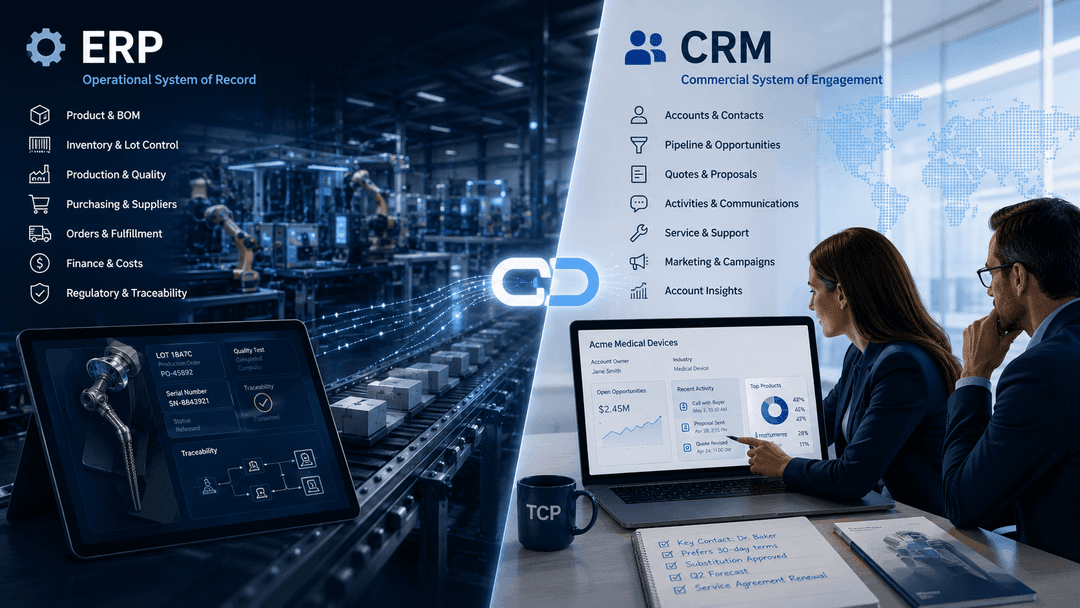
Most comparisons between an ERP and a CRM treat the question as a competition. Which system is more capable? Which one should you prioritize? In a medical device company, that framing leads to the wrong decision almost every time.
The more useful question is not which system wins. It is which system owns which record. In this context, ownership means accountability. The system that is accountable for a record is the system that creates it, controls it, and carries it forward. The other system reads it.
That distinction matters in device manufacturing because regulated operations require a clear line between the records a system owns and the records it simply references. When that line is blurry, processes stall, accountability splits, and audits surface gaps that nobody anticipated.
This article draws that line. It describes what an ERP owns, what a CRM owns, where the two systems touch the same workflow, and how to assign ownership before you buy, integrate, or restructure either one.
Why the Question Comes Up in Device Manufacturing
Medical device manufacturers run into this question at a predictable moment: when a commercial team asks for visibility into order status, shipment history, or product configuration, and the answer is "that lives in the ERP." Or when an operations team needs to know which accounts have active service agreements, and the answer is "that lives in the CRM." The systems are separate, the data is separate, and the friction is immediate.
The confusion is understandable. Both systems touch customer-adjacent information. An ERP processes orders tied to accounts. A CRM manages accounts tied to orders. When neither system is clearly designated as the owner of a shared record type, teams duplicate data, build workarounds, or simply stop trusting either system.
This question also surfaces more often in device manufacturing than in other industries for structural reasons. ERP selection in this sector is heavily influenced by compliance and traceability requirements. That weight pushes ERP evaluations toward operational and quality capabilities, sometimes at the expense of commercial process design. The CRM question often comes later, after the ERP is live, when sales and marketing teams realize their needs were not built into the original scope.
The result is a gap. Not between the systems themselves, but between the processes that each system was designed to own. This article addresses that gap. For a practical comparison of using an ERP's built-in CRM module versus a dedicated platform, see Should You Use the CRM That Came With Your ERP?
The common sources of confusion in device companies include:
- Both systems store account and contact records, but with different purposes and different levels of control
- Order data exists in the ERP, but commercial context around why an order was placed lives in the CRM
- Service interactions may start in either system depending on how the team is structured
- Installed base and product ownership records can drift between systems when ownership is not assigned at the outset
- Platform selection conversations often happen separately for ERP and CRM, without a shared model of where each record belongs
What the ERP Owns
The ERP is the system of operational record. It owns the processes and data that govern how a product is made, moved, purchased, and delivered. In a medical device manufacturer, that scope is wide, because the operational record is also the traceable record.
When a process affects product identity, material status, production execution, or fulfillment, the ERP owns it. That is the rule. It applies even if the ERP surfaces that data to another system for reference.
What belongs in the ERP
| Record or process | Why the ERP owns it |
|---|---|
| Item master and product configuration | The authoritative definition of what a product is, including structure, revision, and applicable specifications |
| Bill of materials | The controlled list of components that make up a finished device, tied to revision and production routing |
| Inventory and lot control | Real-time material status, location, quantity, and lot or serial traceability across the supply chain |
| Purchase orders and supplier records | Procurement transactions, supplier qualification data, and receiving records tied to material traceability |
| Production orders and routings | The execution record of how a device was built, by whom, on what equipment, and in what sequence |
| Sales orders and fulfillment | The transactional record of what was committed and what was shipped, including item, quantity, price, and destination |
| Planning and demand signals | Capacity, scheduling, and material requirements tied to operational execution |
| Financial transactions | Cost of goods, inventory valuation, and the accounting records that flow from operational activity |
The ERP also establishes traceability. When a device ships, the ERP holds the lot number, the serial number if applicable, the bill of materials at the time of production, and the fulfillment record. That chain of custody doesn't live in the CRM, and it shouldn't.
This does not mean the CRM cannot read ERP data. A well-integrated environment surfaces order status, shipment history, and product configuration inside the CRM so commercial teams have context. But reading a record is not the same as owning it. The ERP remains the source of truth, and the CRM displays what the ERP holds.
For device manufacturers choosing a CRM platform, understanding this boundary before selection prevents a common mistake: evaluating a CRM on its ability to replicate ERP functions rather than complement them.
What the CRM Owns
The CRM is the system of commercial record. It owns the processes and data that govern how a company manages its relationships with customers, prospects, and the people who influence purchasing decisions. In a medical device manufacturer, that scope includes accounts, contacts, pipeline, engagement history, and the commercial context that surrounds every sale.
When a process is about who you are selling to, what they have bought, what they have asked for, or how the relationship is developing, the CRM owns it. The ERP does not.
What belongs in the CRM
| Record or process | Why the CRM owns it |
|---|---|
| Account and contact records | The commercial identity of a customer, including organizational structure, key contacts, and relationship history |
| Opportunities and pipeline | Active sales pursuits, stage progression, probability, and forecast contribution |
| Activity history | Calls, meetings, emails, and touchpoints that constitute the relationship record over time |
| Quotes and proposals | Commercial offers in progress, before they become confirmed orders in the ERP |
| Service cases and support interactions | Customer-reported issues, requests, and follow-up activity managed on the commercial side |
| Territory and coverage assignments | Which rep owns which account or geography, and how coverage is structured |
| Account development plans | Strategic context around how a customer relationship is expected to grow |
| Certification status as a commercial gate | Whether a customer or site has met the prerequisites that govern what can be sold or supported |
That last row deserves a specific note. In device manufacturing, some products require that a customer site, a clinician, or a facility hold a current certification before a sale can proceed or a device can be supported. Tracking that status as a commercial gate, knowing whether the gate is open before a rep commits to a deal, is a CRM function. The CRM records the status, surfaces it to the sales team, and flags when it lapses. That is a commercial workflow, and the CRM owns it.
For medical device manufacturers, a CRM calibrated to the sector's specific demands handles physician relationships, site-of-care account structures, and the commercial gates that govern what can be sold and to whom. TCP's CRM for MedTech is built on SugarAI and integrated with ERP to manage exactly this scope.
The CRM does not own the product record, the fulfillment record, or the traceability chain. It reads those from the ERP. That is the boundary.
Where the Two Overlap, and Which One Should Win
The boundary between ERP and CRM is clear in theory. In practice, several workflows touch both systems, and the question of which one owns the record becomes consequential.
The answer is always the same: the system accountable for the record owns it. The other system reads it.
Common overlap points and how to resolve them
| Workflow | Touches ERP | Touches CRM | Owner |
|---|---|---|---|
| Quote to order | Order confirmation, pricing, fulfillment | Opportunity, proposal, commercial approval | ERP owns the order. CRM owns the opportunity and the commercial record that preceded it. |
| Complaint intake | Product traceability, lot and serial records | Account, contact, service case | CRM may capture the initial interaction. The product record and traceability chain stay in the ERP. |
| Installed base | Shipped product, serial number, configuration | Account, site, service history | ERP owns what was shipped. CRM owns the relationship and service context. |
| Pricing and contract terms | Approved price lists, customer-specific pricing in the order | Account-level commercial agreements, negotiated terms | ERP owns the executed price on the order. CRM owns the commercial agreement that produced it. |
| Demand forecasting | Production planning, material requirements | Pipeline, opportunity-weighted forecast | ERP owns the operational plan. CRM contributes the commercial signal. |
| Account hierarchy | Ship-to and bill-to records on orders | Parent-child account structure, coverage model | ERP owns the transactional address records. CRM owns the commercial account model. |
The complaint workflow is worth examining directly. A customer reports a problem. That interaction may start in the CRM as a service case, because the rep or service team is the first point of contact. But the product involved has a lot number, a serial number, and a production and fulfillment history that lives in the ERP. The CRM does not become the system of record for the product simply because the conversation started there.
The same logic applies to every overlap. The question is not where the workflow starts. It is where the record lives and which system is accountable for its accuracy and continuity.
Duplication is the failure mode to avoid. When both systems carry their own version of the same record without a designated owner, you can't trust either version. A SugarAI and Epicor integration resolves this by connecting the two systems so each reads from the other's records rather than maintaining a parallel copy. The ERP remains the source for operational data. The CRM remains the source for commercial data. Neither duplicates what the other owns.
The Four Questions to Ask Before You Buy Either
Before evaluating any platform, run these four questions against your current state. The answers will show where ownership is unclear, where it is already settled, and which system to select or strengthen first.
- Which system will hold the hospital's account structure, and can it model a multi-site system?If the answer is the ERP, the account model will be transactional: ship-to and bill-to addresses tied to orders. If the answer is the CRM, the account model can carry the full commercial hierarchy, including parent health systems, member hospitals, individual sites of care, and the contacts at each level. For most device manufacturers selling into health systems, the CRM should own that structure. The ERP reads the accounts it needs for order processing.
- Where does a rep look to see what a customer already owns, and how many clicks is it?If the answer requires leaving the CRM and logging into the ERP, the integration is incomplete. A rep should be able to see installed products, order history, and service status from within the CRM without switching systems. The ERP owns those records. The CRM surfaces them. If that is not happening, the integration gap is the problem, not the systems themselves.
- When a device requires certification to sell or support, where is that status held, and what does the system do when it lapses?Certification status as a commercial gate belongs in the CRM. The CRM is where a rep checks eligibility before committing to a deal, and where the team is alerted when a status expires. The ERP may carry product-level requirements, but the account-level commercial gate belongs in the CRM. If that status currently lives in a spreadsheet, neither system owns it, and the gap is a process risk.
- If you replaced either system in three years, which one would take the commercial history with it?The answer should be the CRM, without hesitation. Opportunity history, activity records, account development context, and relationship data are commercial assets that belong in the CRM. If a significant portion of that history is currently in the ERP, or in neither system, the ownership model isn't established. Replacing the ERP should not mean losing the commercial record. Replacing the CRM should not mean losing the operational record.
If your answers to any of these questions are unclear, that is the finding. Unclear ownership before a purchase decision becomes a structural problem after go-live.
If you are preparing an RFP for either system, use a requirements template that maps each functional area to a designated owner before you send it to vendors. Download the CRM RFP template to structure your requirements around ownership, not just features.
Ready to map your requirements before you evaluate? Talk to a TCP advisor about where the boundary should fall in your environment.
Where to Start
The most common mistake in a device company's system evaluation is starting with the vendor. Teams schedule demos, collect pricing, and compare feature lists before agreeing on what each system should own. The result is a selection process that optimizes for the wrong things.
Start with the two columns instead.
Step 1: Map your requirements to ERP or CRM before you evaluate either
List every process your commercial and operations teams rely on. For each one, assign it to a column: ERP-owned or CRM-owned. Use the ownership rule as the test. If the process creates or controls a product, material, or fulfillment record, it belongs in the ERP column. If it manages a relationship, pipeline, account structure, or commercial interaction, it belongs in the CRM column. If it appears in both columns, assign the record owner and note that the other system reads it.
This exercise will surface gaps faster than any vendor demo. The processes that cannot be cleanly assigned are the ones where your current environment has no designated owner.
Step 2: Involve the commercial team in the ERP selection, not after it
Operations, IT, or finance typically lead ERP selections in device manufacturing. The commercial team is consulted late, if at all. That sequencing produces an ERP that handles production and fulfillment well but creates friction for sales and service teams who need to work with the data it holds.
The commercial team doesn't need to drive ERP selection. But they need to be present when the integration scope is defined. The questions they ask about order visibility, account data, service history, and installed base determine whether the ERP and CRM can work together cleanly after go-live.
Step 3: Decide the integration approach before you sign
Integration is not a post-implementation concern. It is a selection criterion. Before signing a contract for either system, the team should have a clear answer to how the two systems will exchange data, which records flow in which direction, and which system wins when the same data appears in both.
A pre-defined integration model prevents the most common failure mode: two systems that both hold account data, order data, or product data, with no agreed owner, and no reliable way to know which version is current.
The boundary between ERP and CRM does not resolve itself after go-live. You have to define it before selection starts. That definition is the work.
Download the CRM RFP template to build your requirements around ownership before you evaluate vendors. Or speak with a TCP advisor if you want to map the boundary for your specific environment before committing to either system.
Frequently Asked Questions
Physician relationships in device manufacturing move through stages: awareness, clinical evaluation, adoption, advocacy. Managing those stages requires a CRM that can track where each physician is in that progression, what interactions have occurred at each stage, and what the next action is. That is a relationship management workflow, and it belongs entirely in the CRM. The ERP has no role. The practical implication is that a device manufacturer evaluating a CRM should test its ability to model physician development as a structured, trackable process, not just a contact record with attached notes.
Integrated delivery networks and group purchasing organizations create multi-level account structures that a basic contact database cannot model. The commercial account hierarchy, covering parent organization, member institutions, individual sites of care, and the contacts at each level, belongs in the CRM. The ERP holds the transactional ship-to and bill-to records that flow from orders, but it is not designed to carry the full commercial model of how a health system is structured and how coverage is assigned across it. The modeling challenge is significant enough to warrant its own evaluation criterion when selecting a CRM for the device sector.
Medical device manufacturers need a CRM that can handle physician and clinician relationships, site-of-care account hierarchies, certification-gated selling, and integration with an ERP that carries the operational record. Generic CRM platforms built for horizontal B2B sales often lack the account modeling and commercial gate capabilities that device selling requires. TCP implements SugarAI as its platform for medtech manufacturers, configured around the specific relationship structures, territory models, and commercial workflows that the sector demands.
IFU review and approval is a quality management and document control function, not a CRM function. CRM is not the right system for managing controlled documents, version approvals, or records of who reviewed and approved a regulated document at a specific revision. That workflow belongs in a quality management system or in an ERP with document control capabilities. Saying so plainly is the correct answer, and it illustrates the article's own argument: assigning a process to the wrong system because it is convenient does not make the system accountable for it.
The ERP owns the operational record: inventory, production, purchasing, fulfillment, and the traceability chain that follows a device from material receipt to shipment. The CRM owns the commercial record: accounts, contacts, pipeline, activity history, and the relationship context that surrounds every sale. The boundary is accountability. The system accountable for a record owns it. The other system reads it. For a device manufacturer, getting that boundary wrong before go-live creates process friction, data duplication, and gaps that are expensive to close later.
If the commercial history is in the CRM where it belongs, an ERP replacement does not touch it. Opportunity records, activity logs, account development context, and relationship history stay in the CRM regardless of what happens to the ERP. If commercial history has drifted into the ERP, or exists only in the ERP's order and customer records, then an ERP replacement creates a data migration problem and a commercial loss. This is one of the clearest practical arguments for establishing CRM ownership of commercial records before replacing either system: the migration scope for an ERP replacement should not include commercial history.
Yes, if the company has both operational records to manage and commercial relationships to manage, which every device manufacturer does. The ERP handles the product, production, inventory, and fulfillment. The CRM handles the accounts, the pipeline, the engagement, and the commercial context. Neither system can do the other's job without significant compromise. A manufacturer that tries to run commercial operations from the ERP will have a contact list with no relationship depth. A manufacturer that tries to run operational records from the CRM will have a pipeline with no traceability. The systems are complementary by design. The question is not whether to run both, but how to define the boundary between them before selecting either one.
An ERP can produce demand signals based on order history, backlog, and planning parameters. That is not the same as sales forecasting. Sales forecasting in a device company depends on pipeline data: which opportunities are in progress, their probability, and how the commercial team expects them to close. That data lives in the CRM. An ERP-only forecast is a backward-looking calculation based on what has already been ordered. A CRM-informed forecast incorporates what is expected to be ordered. The two are complementary, but the ERP cannot produce the commercial forecast on its own because it does not hold the commercial data.
The question has two parts, and the answer depends on which gate you're tracking. Product-level requirements, meaning what certifications a device itself carries, are part of the item master and belong in the ERP. Account-level commercial gates, whether a specific customer site or clinician holds a current certification that permits a sale or support interaction, are tracked in the CRM as a commercial status field. The CRM surfaces that status to the rep before the rep commits a deal. It flags when the status lapses. It does not replace any validated system of record for certification management. That distinction matters for device manufacturers: the CRM is a commercial gate, not a compliance system.
Territory management by geography is a CRM function. The CRM holds the territory model, assigns accounts and contacts to the appropriate rep based on location, and ensures that coverage is consistent and auditable. For device manufacturers with field sales teams covering defined geographies, the CRM sets territory boundaries, manages exceptions, and makes coverage gaps visible. The ERP holds the ship-to addresses on orders, but it does not manage the commercial coverage model that determines which rep is responsible for which account.


